Perio Forms & Information
|
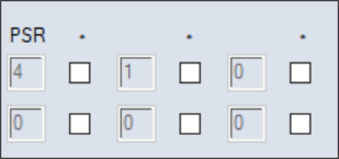
The Perio EPR Forms window allows you to add and manage perio forms for the selected patient, and track perio information, such as current Perio Type, Prognosis, and Perio Screening and Recording (PSR) scores. The patient’s medical alerts, if any are on record, also display. PSR scores are used as a diagnostic tool for the early detection of periodontal disease. Each box represents an intraoral sextant. Intraoral sextants are designated S1-S6 beginning in the maxillary upper right sextant (S1), proceeding in a clockwise manner, and finishing in the mandibular lower right sextant (S6). If your institution is set up to auto-calculate PSR scores, they are based on the patient’s most recent incomplete, complete, or closed exam and are calculated on the worst score within a sextant. Example: If pocket depth is charted and there are pocket depths of 3.0 mm and 5.00 mm in the same sextant, the calculation will be based on the 5.0 mm depth. Note: In the EHR module > Perio tab, the PSR scores are based on the selected exam. If your institution is not set up to auto-calculate PSR scores, you will need to enter the PSR score values manually. PSR scores indicate the following:
Forms management may include the following: Perio information management may include the following: |